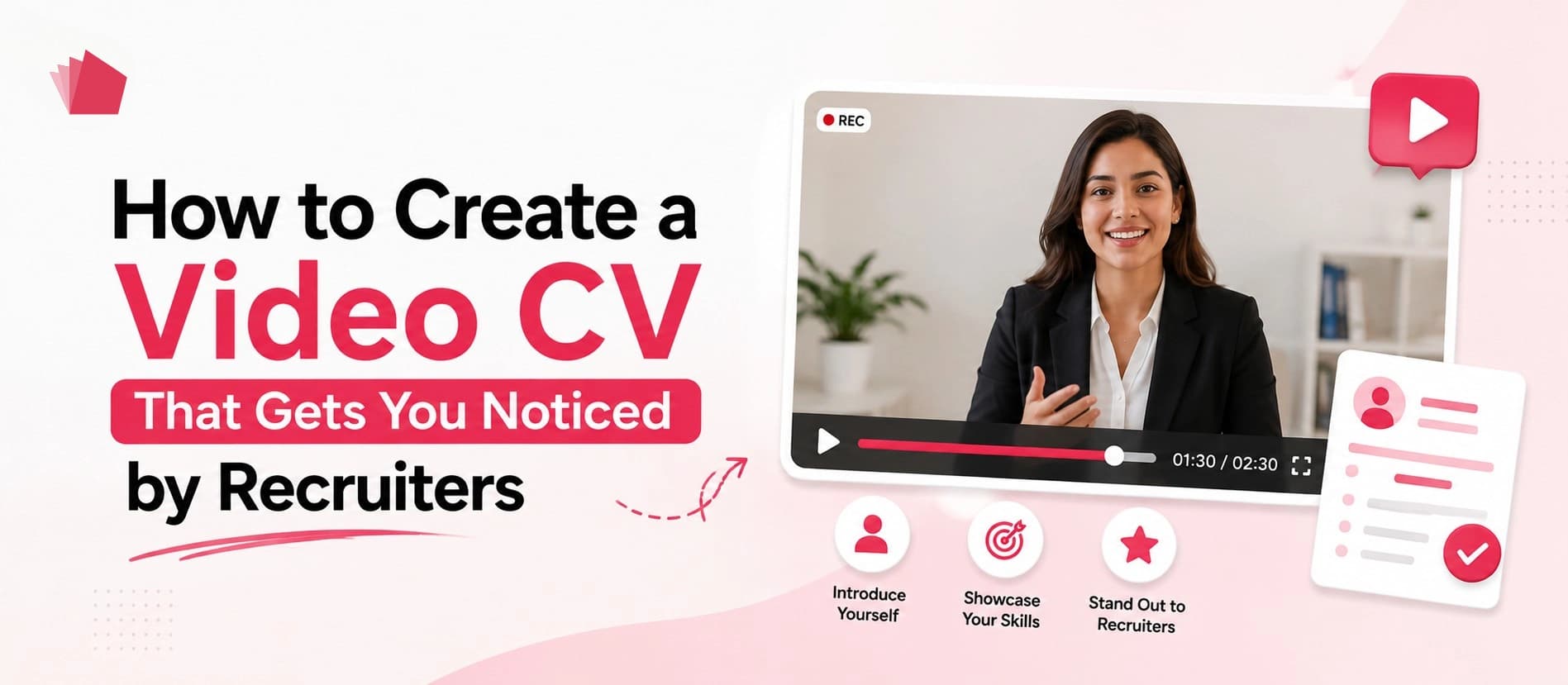
How to Create a Video CV That Gets You Noticed by Recruiters
25 Aug 2026•John Doe•12 min read
TL;DR:
- Know your target role before recording.
- Start with a strong introduction that explains who you are.
- Highlight relevant experience and skills instead of repeating your entire CV.
- Include one or two specific achievements to demonstrate your value.
- Keep your video concise, with around 60-120 seconds being a practical target for many applications.
- Use clear audio, good lighting, and a professional background
Sending a traditional CV gives recruiters information about your experience, education, and skills. But it doesn't always show how you communicate, present yourself, or tell your professional story.
That's where a video CV can add another dimension to your job application.
A video CV is a short professional introduction where you speak directly to potential employers and recruiters. Instead of simply listing your qualifications, you can explain your experience, highlight your achievements, demonstrate your communication style, and show the person behind the CV.
But simply recording yourself isn't enough.
A good video CV needs to be short, relevant, authentic, professional, and focused on what you can offer an employer.
In this guide, you'll learn exactly how to create a video CV that makes a strong first impression.
What Is a Video CV?
A video CV is a short professional video that introduces a job seeker to potential employers and recruiters.
It typically covers your:
- Professional background
- Key skills
- Relevant experience
- Career achievements
- Career goals
- Interest in a particular type of opportunity
A video CV can work alongside your traditional CV rather than replacing it.
Your written CV provides recruiters with detailed career information, while your video CV allows them to see and hear the person behind the application.
Quick answer: How do you create a video CV?
- Define the role you're targeting.
- Choose your strongest and most relevant experience.
- Write a short script or outline.
- Record yourself in a professional setting.
- Keep the video focused and concise.
- Review the audio, lighting, and delivery.
- Add your professional details and work highlights.
- Share your video CV through a professional link.
With CVN.me, you can create a personal profile, record or upload your video CV, add your experience and work highlights, and share your profile through a unique link.
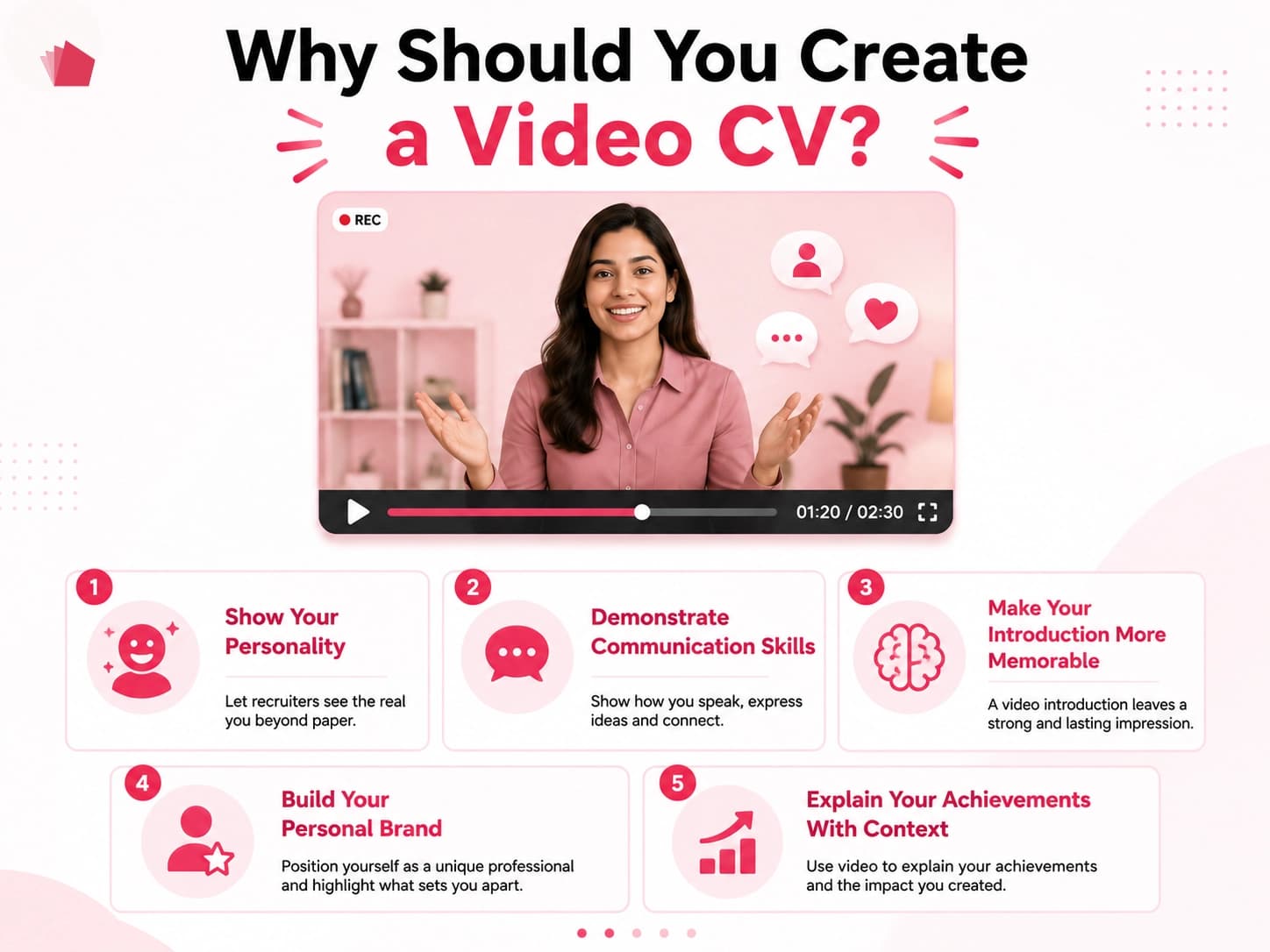
Why Should You Create a Video CV?
A video CV shouldn't simply repeat everything written in your resume.
Its purpose is to give recruiters another way to understand who you are and what you bring to the table.
1. Show Your Personality
A traditional CV tells recruiters about your professional background.
A video CV lets them experience your communication style and personality.
This can be particularly useful for roles where communication and presentation are important.
2. Demonstrate Communication Skills
Your video CV gives you an opportunity to demonstrate how clearly and confidently you communicate.
This can be valuable for roles in:
- Sales
- Marketing
- Customer success
- Recruitment
- Consulting
- Teaching
- Public relations
- Management
- Media
- Content creation
3. Make Your Introduction More Memorable
Recruiters may review many applications for the same position.
A well-made video CV can provide another way for your application to be remembered.
The objective isn't to create a cinematic production.
It's to make your professional story clear and relevant.
4. Build Your Personal Brand
Your video CV can become part of your broader professional identity.
Instead of creating a new introduction every time you network or apply for an opportunity, you can share a professional video CV link.
5. Explain Your Achievements With Context
A written CV might say:
"Increased organic traffic by 65%."
A video CV lets you explain what happened:
"One of the projects I'm most proud of was an SEO campaign where I helped increase organic traffic by 65% through technical improvements and a new content strategy."
The second version gives the achievement context and helps communicate your contribution.
What Makes a Video CV Stand Out to Recruiters?
A strong video CV isn't necessarily the most polished or heavily edited one.
Instead, recruiters should be able to understand your professional value quickly.
A good video CV should be:
Clear
The recruiter should immediately understand who you are and what you do.
Relevant
Focus on experience and skills related to the opportunities you're targeting.
Concise
Don't turn your video CV into a five-minute summary of your entire career.
Authentic
Speak naturally rather than sounding like you're reading a corporate advertisement.
Professional
Good lighting, clear audio, appropriate clothing, and a distraction-free background can make a significant difference.
Specific
Whenever possible, support your skills with real examples or measurable achievements.
How CVN.me Helps You Create a Video CV
CVN.me combines your professional profile and video introduction into one video-first profile that you can share with recruiters. Instead of creating everything from scratch, you can use AI-assisted tools to build your profile and video CV, or choose to complete each step manually.
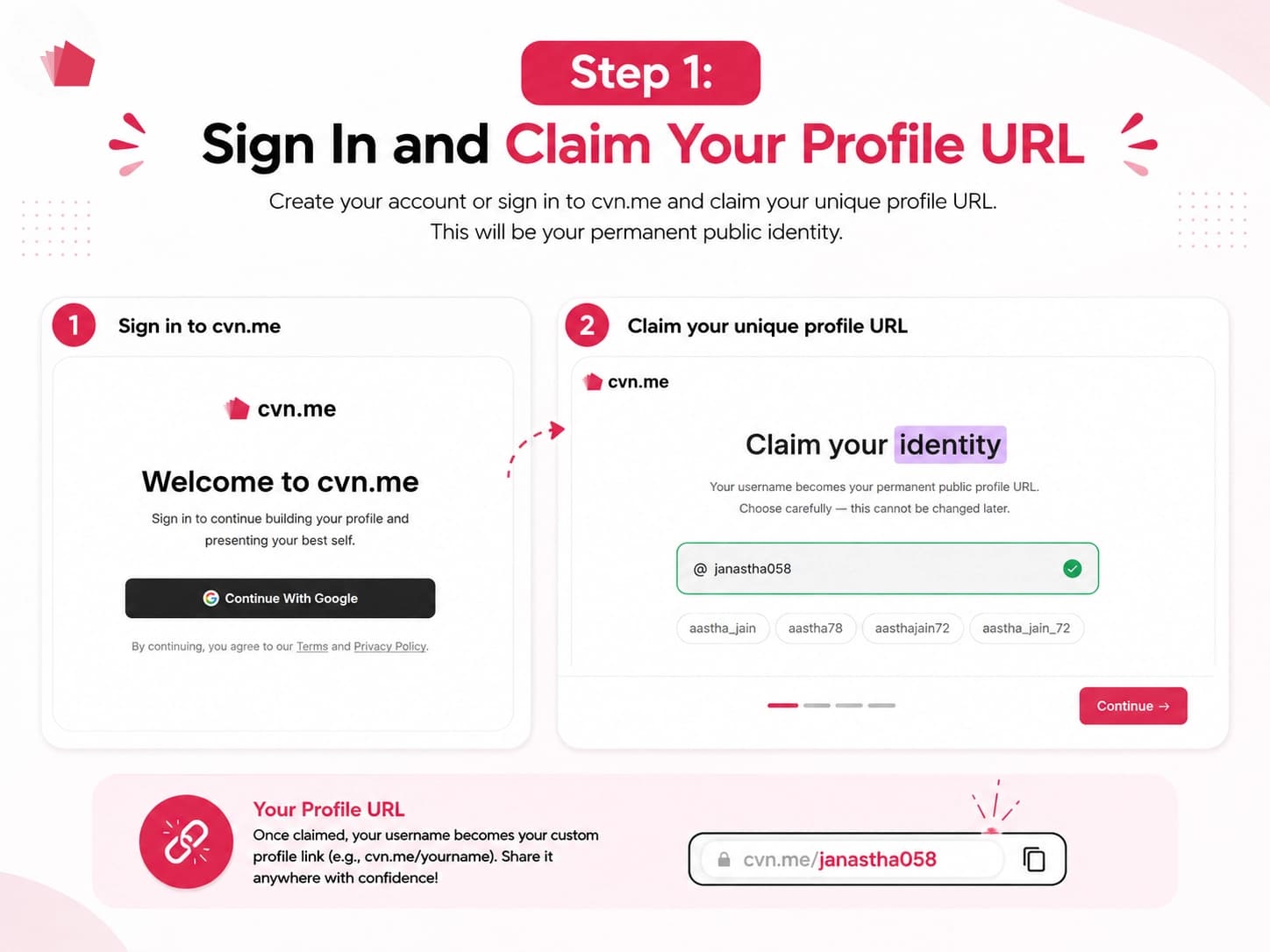
Step 1: Sign In and Claim Your Profile URL
Start by clicking "Create Yours" or "Create your Video CV" on CVN.me and sign in with your Google account.
Next, choose your unique username and claim your permanent public profile URL, such as cvn.me/yourusername. Choose carefully because your username becomes your permanent profile link and cannot be changed later.
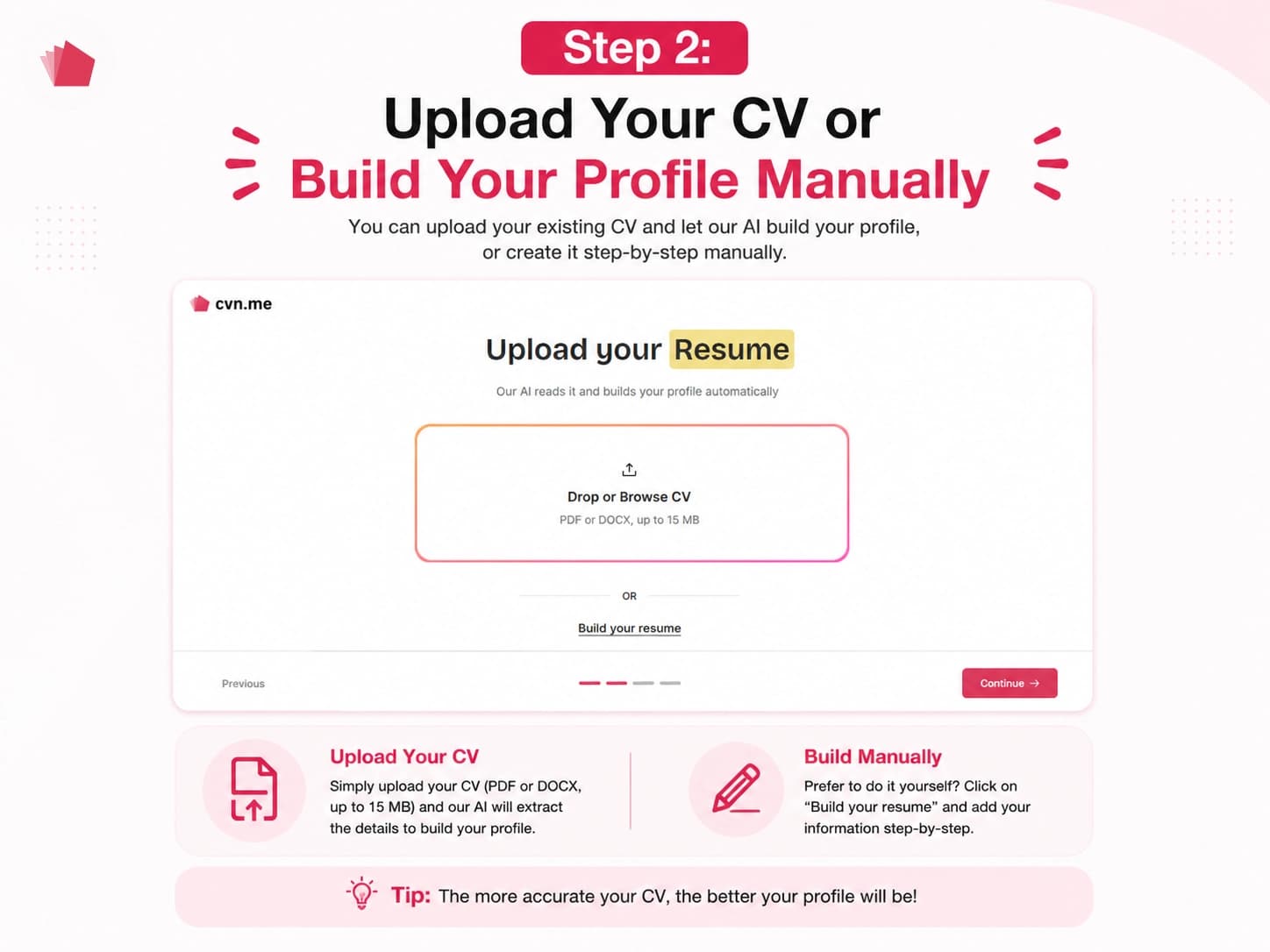
Step 2: Upload Your CV or Build Your Profile Manually
Have an existing CV? Upload it as a PDF or DOCX file, and CVN.me's AI can automatically extract your information and populate your profile, including your name, designation, bio, work experience, education, skills, and other relevant details.
Don't have a CV ready? You can also choose to build your resume manually and add your information yourself.
Once your details are added, complete your profile sections, including About, Work Experience, Education, Skills, and Contact details. You can also add additional information such as career breaks and awards.
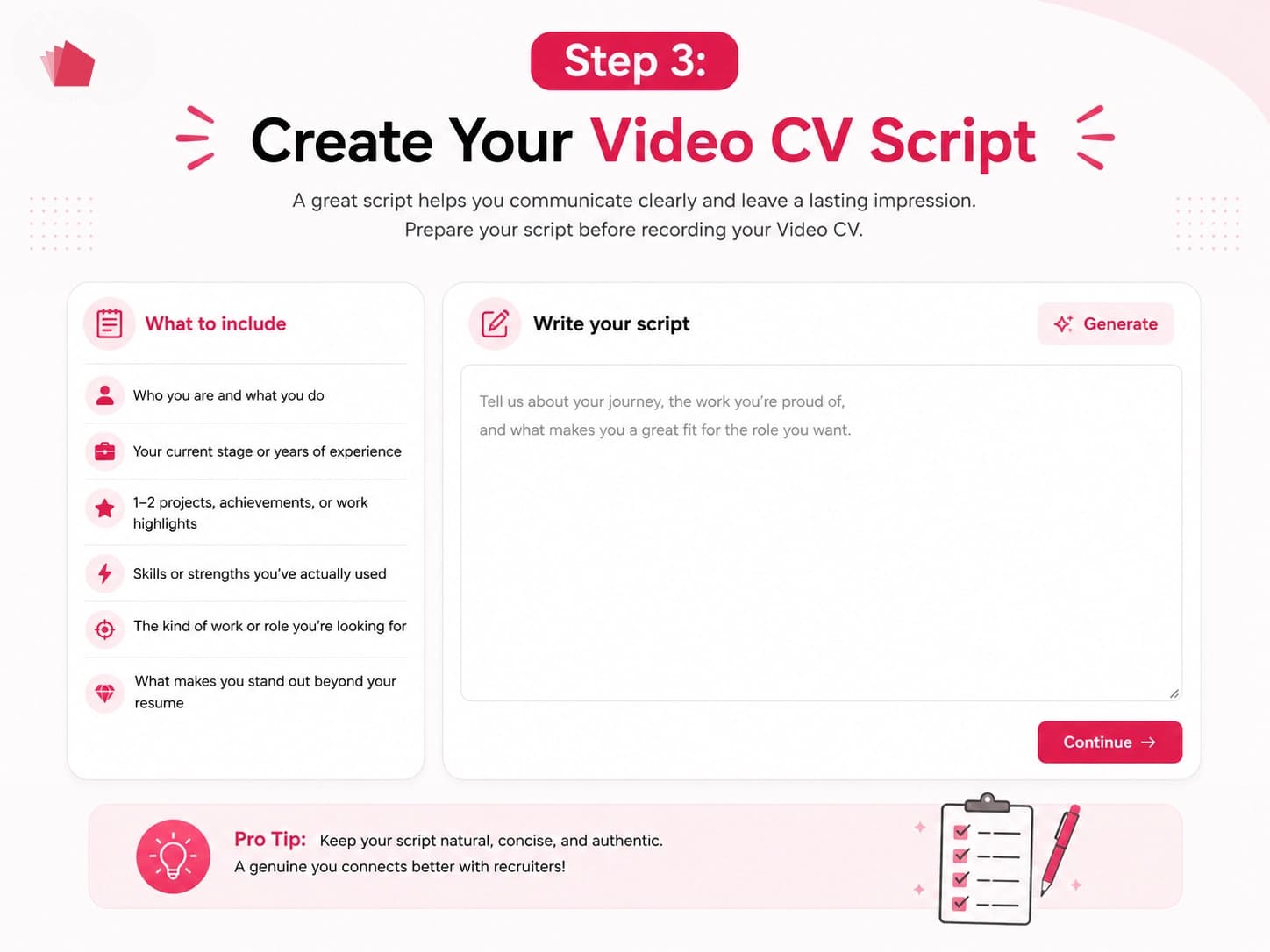
Step 3: Create Your Video CV Script
Once your profile is ready, CVN.me helps you prepare a short script for your video introduction.
You can:
- Let AI draft your script using the information in your profile.
- Write your own script from scratch.
- Use the Refine option to improve and polish your script before recording.
You can also see the estimated reading time, helping you keep your video CV focused and concise.
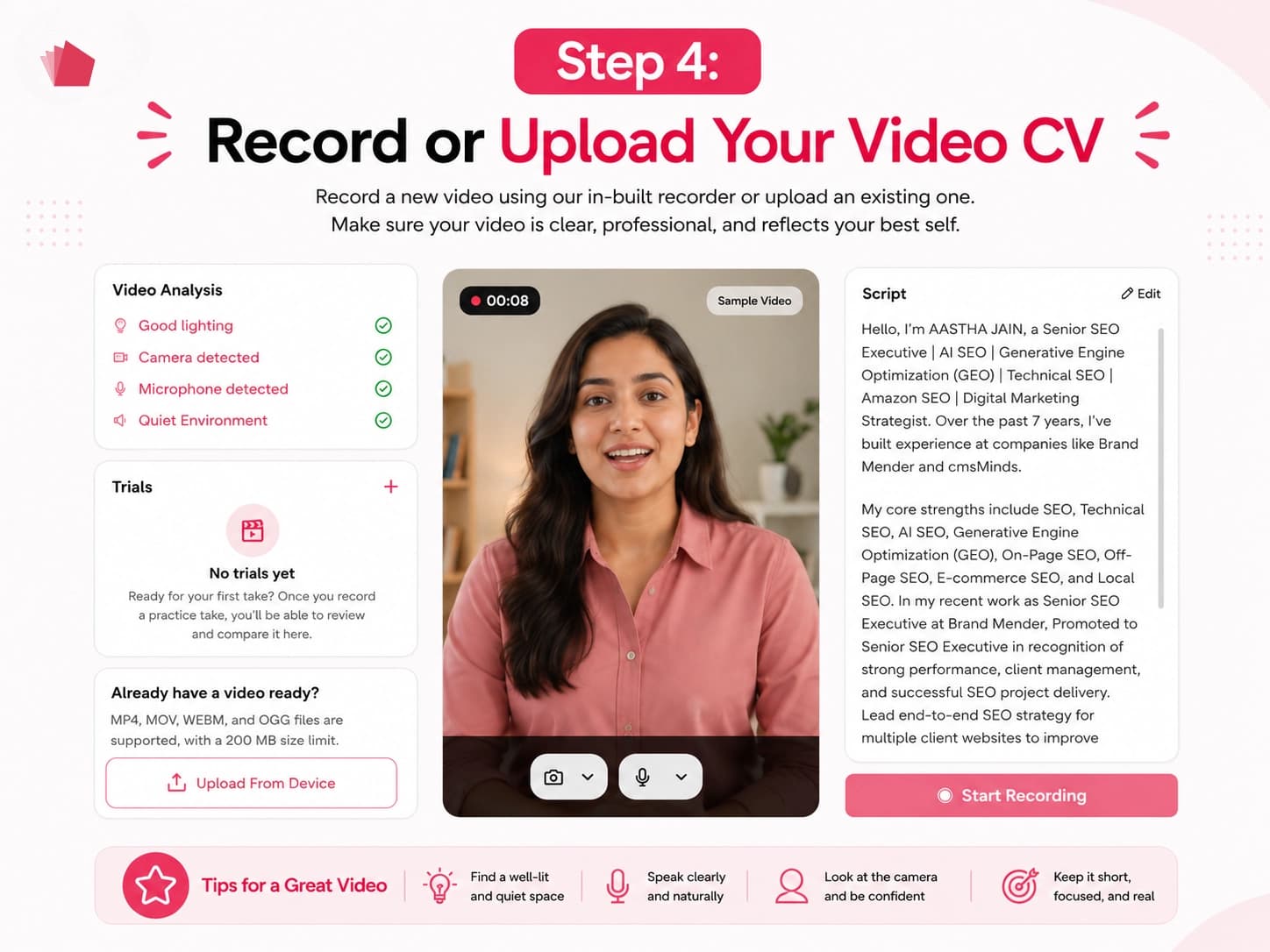
Step 4: Record or Upload Your Video CV
With your script ready, you can choose how you want to create your video.
Record directly through your webcam and use the on-screen teleprompter to follow your script while recording. CVN.me also checks factors such as lighting, camera, microphone, and environmental noise to help you prepare for recording. You can take multiple trial recordings and compare them before choosing your final version.
Already have a video introduction? You can upload your existing video instead.
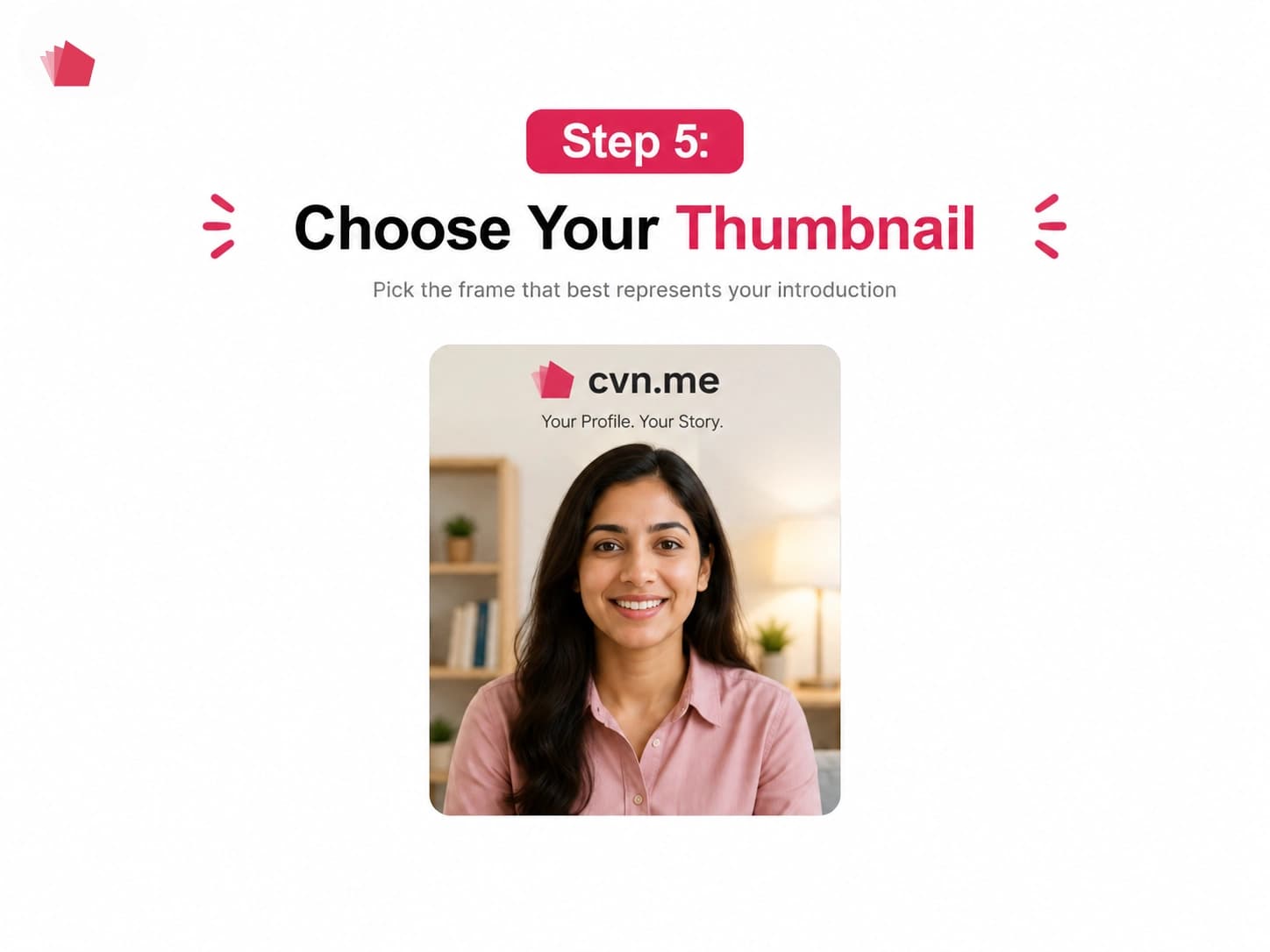
Step 5: Choose Your Video Thumbnail
After recording or uploading your video, select the frame that best represents your professional introduction. This becomes the thumbnail displayed on your public CVN.me profile.
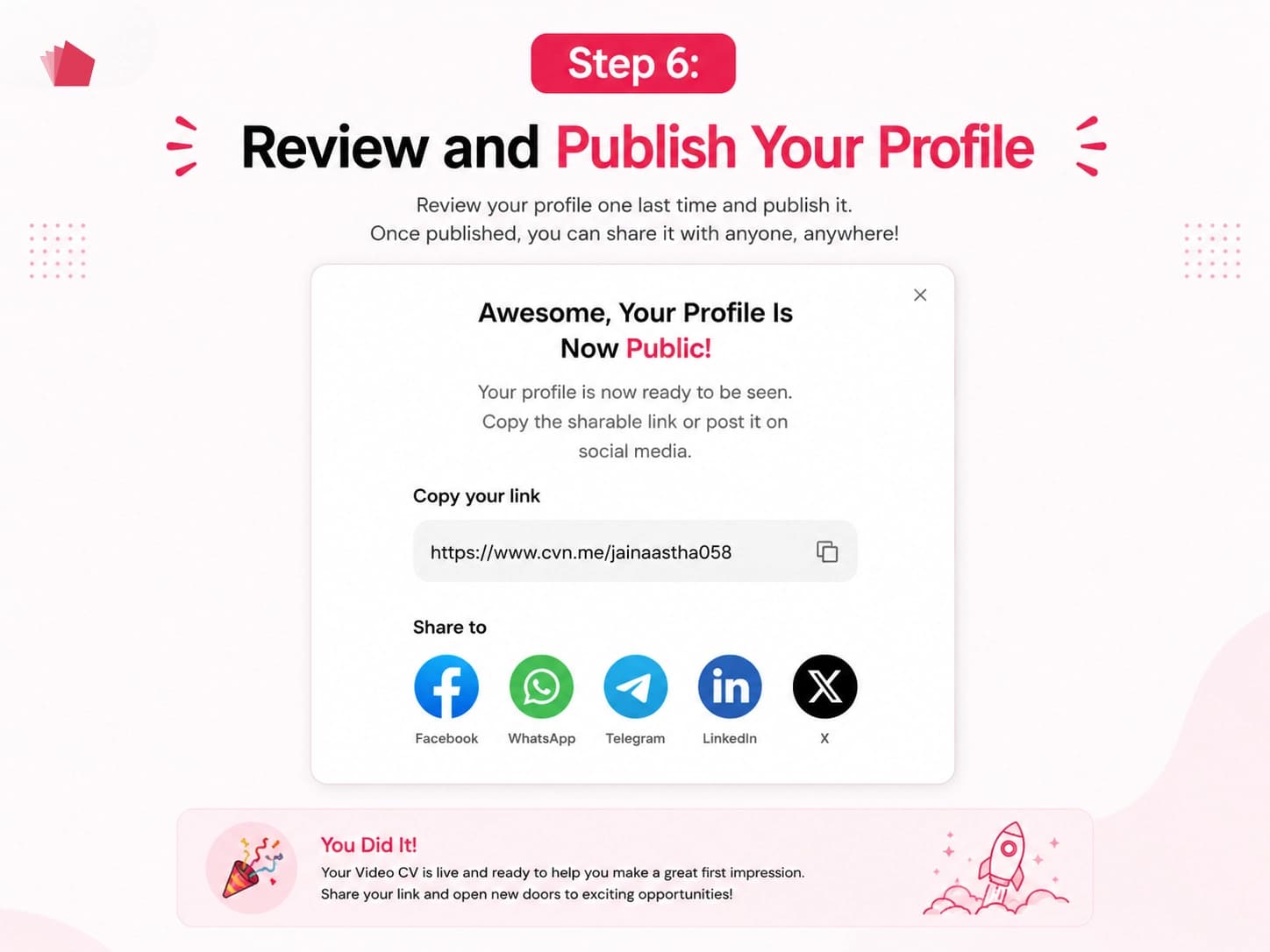
Step 6: Review and Publish Your Profile
Once your video and profile are ready, CVN.me processes your profile and prepares your custom profile URL.
You can then choose the plan that fits your needs and publish your profile.
The Standard Plan includes your video CV, work highlights such as experience, skills, education and portfolio, and a shareable profile link.
The Pro Plan adds features such as a verification badge and enhanced visibility in search and recommendations.
Step 7: Share Your Video CV With Recruiters
Once published, your complete video-first profile is available through your unique CVN.me URL.
Recruiters and other visitors can watch your video introduction and explore your professional information, including your experience, education, skills, and other profile highlights.
You can continue to update your profile, share your link, or upgrade your plan as your career evolves.
From building your professional profile to creating your video script and recording your introduction, CVN.me gives you the flexibility to use AI when you want to save time, or take control and create everything yourself.
What Should You Avoid in a Video CV?
A video CV can hurt your application if it looks rushed, generic, or overly rehearsed.
Avoid these common mistakes.
1. Reading Your Entire CV
Your video should complement your written CV rather than repeat it word-for-word.
2. Making the Video Too Long
Recruiters don't need your entire career history in video format.
Focus on the information that matters most.
3. Using a Generic Introduction
Avoid:
"Hello, my name is John. I'm a hardworking and passionate professional looking for a challenging opportunity."
This doesn't tell the recruiter anything specific.
Instead, explain what you do and what you bring.
4. Listing Skills Without Evidence
Don't simply say:
"I'm creative, hardworking, organized, and a great communicator."
Whenever possible, demonstrate those qualities through experience or achievements.
5. Poor Audio Quality
Recruiters need to understand what you're saying.
If the audio is difficult to hear, even a strong introduction can lose its impact.
6. Overediting the Video
Transitions, animations, music, and effects aren't necessary unless they genuinely support your professional presentation.
7. Forgetting Your Target Audience
A video CV for a creative director shouldn't necessarily look the same as one for an accountant.
Think about the expectations of your target industry.
Video CV Tips for Freshers
You don't need years of experience to create a video CV.
If you're a student or recent graduate, focus on:
- Education
- Internships
- Academic projects
- Personal projects
- Certifications
- Technical skills
- Soft skills
- Extracurricular achievements
- Career interests
For example:
"I'm a recent computer science graduate with experience developing web applications through academic and personal projects. I've worked with JavaScript, React, and Node.js, and recently built an e-commerce application as part of my final project."
Your video CV should focus on potential, skills, and relevant experience, rather than apologizing for having limited work experience.
Video CV Tips for Experienced Professionals
If you have several years of experience, don't try to mention everything.
Instead:
Identify your strongest area of expertise.
Mention your most relevant experience.
Include one or two significant achievements.
Explain what type of opportunity you're looking for.
Keep the introduction focused.
For example, a senior marketing professional could focus on leadership, campaign performance, team management, and measurable business outcomes rather than listing every role they've held.
How to Make Your Video CV More Recruiter-Friendly
Think about your video from the recruiter's perspective.
Within the first few seconds, they should be able to understand:
Who are you?
Your professional identity.
What do you do?
Your core expertise.
What have you achieved?
A relevant result or accomplishment.
What are you looking for?
Your target opportunity.
If your video communicates these points clearly, the recruiter can quickly decide whether they want to explore your profile further.
Video CV Checklist
Before sharing your video CV, check each of these:
- I clearly introduced myself.
- I mentioned my professional background.
- I focused on relevant experience.
- I highlighted 2-3 important skills.
- I included a specific achievement.
- I explained what type of opportunity I'm looking for.
- My video is concise.
- My audio is clear.
- My lighting is good.
- My background is distraction-free.
- I sound natural rather than memorized.
- I reviewed the video before sharing it.
- My professional information is easy to access.
- My video CV link works correctly.
Final Thoughts
A video CV gives you an opportunity to show recruiters more than what's written on a page.
Your traditional CV can communicate your qualifications and career history. Your video CV can add your voice, communication style, personality, and professional story.
The key isn't to create the most heavily edited video.
It's to create an introduction that is clear, relevant, specific, authentic, and easy for recruiters to understand.
With CVN.me, you can bring these elements together in one professional profile, record or upload your video CV, add your experience, skills, education, and portfolio highlights, and share your unique video CV link with recruiters and potential employers.
Your CV tells recruiters what you've done. Your video CV helps them see who you are.
Frequently Asked Questions
What is the best way to create a video CV?
Start by identifying your target role, choose your most relevant experience and achievements, write a short script, record in a quiet and well-lit environment, and keep the final video concise. You can then add supporting career information and share your video CV through a professional link.
How long should a video CV be?
A video CV of around 60-120 seconds is a practical target for many job applications. However, the ideal length depends on the role, experience, and purpose of the video.
What should I say in a video CV?
Introduce yourself, explain your professional background, highlight relevant skills and experience, mention a specific achievement, and explain what type of opportunity you're looking for.
Can a video CV replace a traditional CV?
Usually, a video CV works best alongside a traditional CV rather than replacing it. Your written CV provides detailed career information, while the video allows recruiters to see and hear your professional introduction.
Can freshers create a video CV?
Yes. Freshers can use education, internships, projects, certifications, skills, and achievements to create a strong introduction even without extensive professional experience.
Do I need professional equipment to record a video CV?
No. A smartphone or computer camera can be enough. Clear audio, good lighting, a professional setting, and confident delivery matter more than expensive equipment.
How can I share my video CV with recruiters?
You can share your video CV through a professional profile link, job application, email, LinkedIn, networking message, personal website, or other relevant professional channels. CVN.me provides a unique shareable link for your video CV profile.
Is a video CV suitable for every job?
Not necessarily. Some employers may specifically request a traditional CV or have a particular application format. Always follow the employer's instructions.